Boost Your
Shopify Store's Recurring Revenue With Utterbond!

Your best customers already buy the same product again and again. The coffee drinker reorders every month. The pet owner restocks food before the bag runs empty. The skincare fan repurchases her serum like clockwork. Yet most Shopify stores make these loyal buyers start from scratch every single time, hunting through the site, adding to cart, and checking out for a product they were always going to buy.
That friction costs you money. It also hands your competitor an opening.
Subscribe and save fixes this. It rewards repeat buyers with a small discount in exchange for automatic, recurring delivery. The shopper never runs out. You get predictable revenue instead of hoping they come back. This guide walks you through how to set up subscribe and save on Shopify from start to finish, including the discount math that actually converts, the setup steps inside a subscription app, and the retention moves that keep subscribers paying long after the first order.
Let's get into it.
What Subscribe and Save Really Means
Subscribe and save is a pricing model. A shopper agrees to receive the same product on a repeating schedule, and in return you give them a discount off the regular price. Weekly, monthly, every six weeks, whatever suits how fast they use it.
Amazon made the model famous with its Subscribe & Save program back in 2007. Today it powers a huge slice of direct-to-consumer brands selling consumables like coffee, supplements, pet food, cleaning products, and beauty refills.
The difference between this and a plain subscription is the incentive. A basic Shopify subscription app just automates reordering. Subscribe and save puts the savings front and center, so the discount itself becomes the reason to commit. The shopper sees two prices side by side on the product page and picks the one that saves money.
Here is the whole thing in one sentence: same product, same schedule, lower price, cancel anytime.
Why Subscribe and Save Beats One-Time Purchases
The appeal splits neatly between two groups: your shoppers and you.
For shoppers, the pull is convenience plus savings. They stop thinking about reordering. The product shows up right before they need it. And they pay a little less every time.
For merchants, the payoff runs deeper. You trade a small per-order discount for a recurring relationship. That relationship compounds. Subscription customers tend to generate three to five times more lifetime revenue than one-time buyers, because you are no longer paying to reacquire them month after month.
Here is how the two models stack up:
For stores selling anything people burn through and rebuy, subscribe and save almost always wins on long-term revenue, even after the discount. The math holds because you keep the customer instead of chasing a new one.
The recurring side also smooths your cash flow. Instead of guessing what next month brings, you head into it with a base of committed orders already locked in through Shopify recurring payments. That predictability changes how you plan inventory, staffing, and ad spend.
Which Products Fit a Subscribe and Save Program
Not every product belongs in a subscribe and save offer. The model amplifies repeat behavior, it does not create it. So the first question is simple: would this customer naturally buy this again on a predictable schedule?
If the answer is yes, you have a fit. Strong candidates share a few traits:
- Consumables people finish and rebuy. Coffee, tea, protein powder, vitamins.
- Products where running out is a real pain. Pet food, contact lenses, razor blades, baby formula.
- Predictable usage rates. One bottle of serum every 30 or 60 days. A 30-day supplement pack on a 30-day cycle.
- Household staples. Detergent, paper goods, soap refills.
- Unit price under roughly 80 dollars. Above that, the recurring charge starts feeling like a fresh purchase decision each cycle, which invites cancellations.
Poor fits are just as clear. Skip subscribe and save for anything with a long replacement cycle like cookware or electronics. Skip it where taste drives the purchase, like apparel or fragrance, because those shoppers want variety and will churn out of boredom. And skip it where choosing the product is the fun part, like artisan goods or gifts. Those belong in a curated box, not a repeat order.
Quick gut check before you commit a SKU to a subscribe and save program:
- Does the customer repurchase within 60 days?
- Is the one-time repeat rate at least 20 percent?
- Is the product the same every cycle, same flavor, same size?
- Can you reliably ship that SKU for six months straight?
Two or more "no" answers mean you should fix the product or the fulfillment before layering a subscription on top.
The Discount Math That Converts Without Wrecking Margin
This is the decision most merchants overthink and underprepare for. The discount percentage makes or breaks the whole offer.
Across consumer goods stores, the pattern stays remarkably steady:
- 5 percent feels stingy. It rarely moves anyone.
- 10 percent is the sweet spot for most consumables. Enough to flip the decision, small enough to protect margin.
- 15 percent pushes subscriber volume higher and works well for most DTC brands.
- 20 percent converts hard, especially on first orders, but watch your lifetime margin closely.
- 25 percent and up erodes profit. The extra signups almost never make up for it long term.
Amazon's own data suggests a 10 to 15 percent discount can lift conversion by up to 1.8 times versus no discount. So the incentive works. The trick is sizing it against lifetime margin, not single-order margin.
Run a quick model before you launch. Take a 30-dollar product at 60 percent gross margin. A 10 percent subscription discount drops your margin from 18 dollars to 15 dollars per order. You give up 3 dollars. If that subscriber stays six orders, you earn 90 dollars in margin instead of maybe 54 from a one-time buyer who reordered twice. Clear win. If they churn after two orders, you subsidized behavior you already had. Your natural repeat rate decides where the line sits.
Two Discount Tactics Worth Testing
Split the discount. A popular structure gives 20 percent off the first order and 10 percent off every renewal after that. The bigger first-order incentive flips the buyer, while the lower ongoing rate protects your margin on the long tail. Just state the ongoing rate clearly at signup, because surprising someone with a smaller second-order discount is a known cancellation trigger.
Utterbond supports exactly this. You set one discount for the trial or first cycle and a different discount once that cycle ends, so the offer stays generous where it matters and lean where it counts.
Try free shipping instead of a deeper percentage. For products under 40 dollars, free shipping on subscription orders often beats a straight discount. Shipping is the cost customers resent most, so flipping it to free feels bigger than the actual dollar value. Many stores pair the two: "10 percent off and free shipping on subscription" outperforms "15 percent off" even at similar cost to you.
Here is a fast reference:
The safe move: start at 10 percent plus free shipping, test against 15, and let your data pick the winner. Raising a discount later is painless. Lowering one after subscribers are locked in is a retention headache.
How to Set Up Subscribe and Save on Shopify Step by Step
Shopify ships with a basic native subscriptions feature, but it stays limited. No custom widget worth showing off, thin discount rules, and a bare-bones customer experience. For a real subscribe and save program with a proper widget, flexible frequencies, a self-serve portal, and recovery tools, you want a dedicated subscription app.
At a high level, the setup runs four steps no matter which app you choose:
- Install a subscription app that uses Shopify's native Subscription Contract API.
- Create a plan with your chosen frequency and discount.
- Attach that plan to the products that qualify.
- Add the widget to your product page and test the full flow.
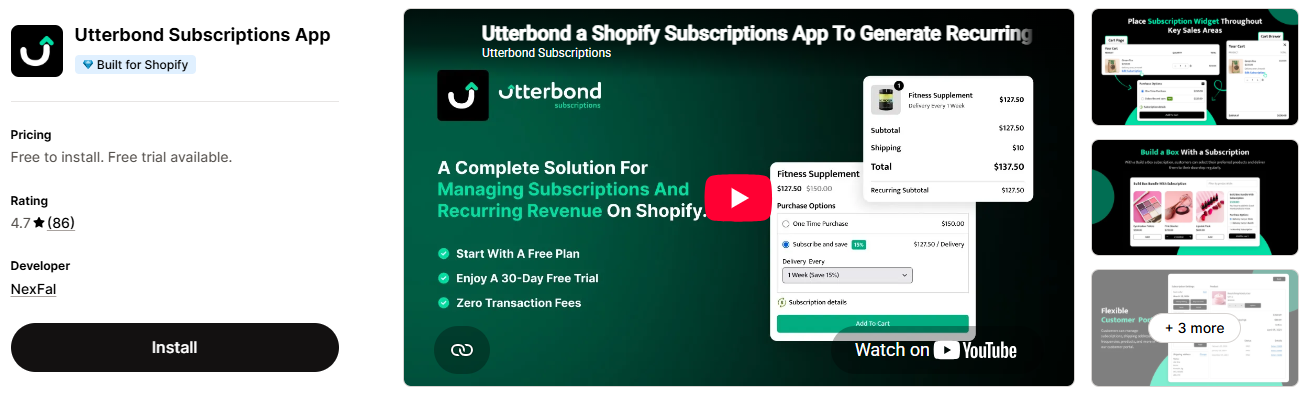
The mechanics take under an hour. The decisions behind each step, which we covered above, are the real work. Now let's walk through building the offer inside an app, using Utterbond as the example since the screens are clean and the options are deep.
Building the Offer Inside a Subscription App
Once Utterbond is installed from the Shopify App Store, head to Subscription Plans and create a new plan. Here is what each part of the setup screen does and how to fill it out.
Basic Info
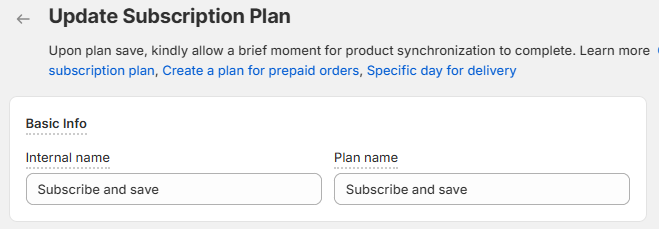
Give the plan an Internal name and a Plan name. The internal name is for your dashboard. The plan name is what shoppers see, so keep it friendly and clear. "Subscribe and Save" works perfectly. Set the status to Active when you are ready to go live.
Frequency
The Frequency prefix is the little label that sits before your delivery options on the widget, like "Delivery every." It reads naturally to the shopper: "Delivery every 1 month."
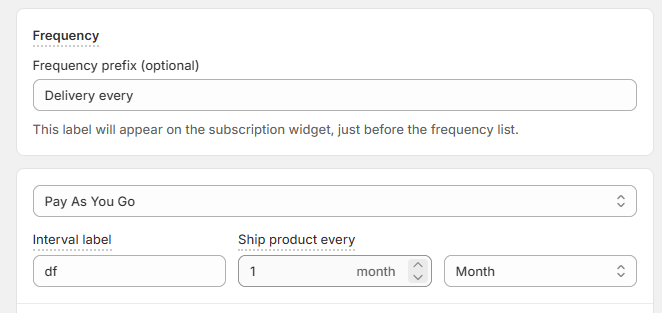
Next, choose your billing type. Utterbond offers a Pay As You Go option, where the customer is charged per shipment as it ships. This is the standard subscribe and save setup because it keeps signup friction low, nobody commits a big lump sum upfront.
Then set the Interval label and how often the product ships, for example every 1 month. Keep your options tight. Two or three cadences cover almost all demand. Offering seven different frequencies overwhelms shoppers and creates fulfillment chaos.
Offer Trial and Discounts
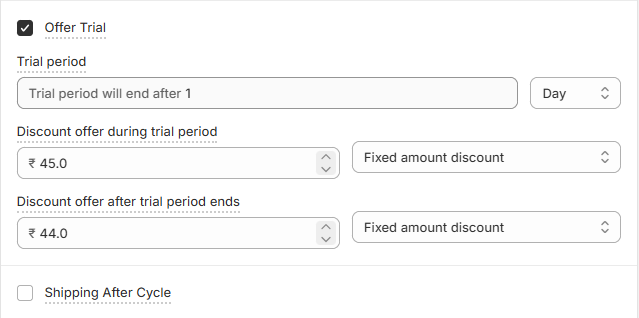
Turn on Offer Trial if you want to run a first-cycle incentive. Utterbond lets you set two separate discounts:
- Discount offer during the trial period, for example, a fixed amount off the first delivery.
- Discount offer after the trial period ends, the ongoing rate for every renewal.
This is where the split-discount tactic from earlier comes to life. Give a stronger discount up front to win the signup, then settle into a sustainable ongoing rate. Both can be a fixed amount or a percentage, whichever suits your pricing.
If you would rather keep it simple, skip the trial and set one flat subscription discount. Either path works.
Advanced Settings
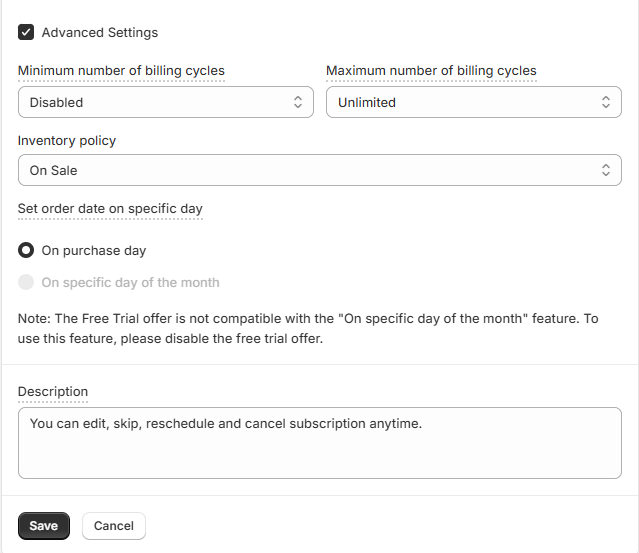
Open Advanced Settings for the controls that protect your margin and your fulfillment:
- Minimum and maximum billing cycles. Leave minimum disabled and maximum unlimited for a classic open-ended subscribe and save, or cap them if your offer needs a defined length.
- Inventory policy. Decide how renewals behave against stock levels so you never charge for something you cannot ship.
- Set order date on specific day. Bill on the purchase day, or line renewals up to a specific day of the month. One note here: a free trial is not compatible with the "specific day of the month" option, so pick one or the other.
Description and Products
Write a short Description that reassures shoppers, something like "Edit, skip, reschedule, or cancel your subscription anytime." That single line lowers signup anxiety more than most merchants expect.
Finally, use Choose Products to attach the plan to the SKUs you want available as subscribe and save items. You can add plenty of products, just in batches. Tie the plan only to products that genuinely renew, so your catalog stays clean and the widget stays meaningful.
Once saved, the subscribe and save option appears on those product pages, ready for shoppers to pick their frequency and check out.
Widget Placement and Product Page Conversion Tips
Setup gets the offer live. Placement gets it clicked. Where and how the widget shows up drives the majority of your subscription conversions, so treat this part as seriously as the discount itself.
A few moves that reliably lift attach rate:
- Show the savings in dollars, not just percentages. "Save 4.50 dollars per order" lands harder than "15 percent off," especially on lower-priced items. Concrete beats abstract.
- Frame frequency in weeks. "Every 4 weeks" feels less like a commitment than "monthly," even though they are nearly the same thing.
- Put the widget above the fold on mobile. Roughly 70 percent of Shopify storefront traffic is mobile. If the widget hides below a long description, most shoppers never see it.
- Keep the one-time option visible. Forcing subscription as the only choice converts in the short run but breeds resentment and cancellations. Let people self-select.
- Add social proof nearby. A simple "join 4,200 subscribers" line next to the widget nudges fence-sitters.
- Surface the next delivery date. "Your next delivery: June 18" beats abstract intervals because shoppers process concrete dates faster.
One technical must: always test the widget on mobile before publishing. Widgets that look sharp on desktop often break on phones, the frequency picker stacks awkwardly, the discount pill wraps, the button gets hard to tap. A broken mobile widget quietly kills conversions before you ever spot the problem in your numbers.
Keeping Subscribers: The Retention Side of the Equation
Signing someone up is step one. Keeping them is where the real money lives. A subscribe-and-save program earns its value over months, so retention deserves as much attention as acquisition.
The single highest-impact lever is a self-serve customer portal. Give subscribers a place to skip a delivery, change frequency, swap a variant, update their card, pause, or cancel without emailing support. A good portal handles 60 to 80 percent of subscription tickets on its own, and it lowers churn because a customer who can pause almost never cancels outright.
A few more retention moves that pay off:
- Send a reminder email before every renewal. A heads-up three to five days out builds trust and cuts disputes. People hate surprise charges, even ones they signed up for.
- Offer pause and skip prominently. Someone who pauses comes back far more often than someone who cancels. Make pause the first option in your cancel flow, and you will recover a healthy slice of would-be churners.
- Reward loyalty at milestones. A free sample or bonus discount at the three- or six-month mark cuts churn in later cohorts, where most subscriptions quietly bleed out.
- Watch your subscription analytics. Track attach rate, churn, and lifetime value separately. A widget that lifts signups but tanks lifetime value is a bad widget. Optimize for the metric that actually pays your bills.
Good subscription management turns a decent offer into a durable revenue stream. The stores that win at subscribe and save obsess over the second, third, and fourth order, not just the first.
Handling Failed Payments, Stockouts, and Renewal Spikes
Once subscribers exist, three operational realities show up. Plan for them before launch, and they stay minor. Ignore them, and they eat your revenue.
Failed payments: Roughly 5 to 10 percent of renewal charges fail on the first try, expired cards, insufficient funds, fraud holds. Without smart retries, that is pure leakage every single month. A solid failed payment recovery sequence, sometimes called dunning, recovers 60 to 75 percent of those failures through timed retries and prompts to update the card. This is one of the fastest wins in the whole model.
Stockouts on renewal days: A subscriber's date hits, your app tries to charge and ship, but the SKU is out of stock. Pick a policy before launch: skip the renewal without charging, substitute a disclosed alternate SKU, or notify and pause. Never charge for something you cannot ship. That is the top source of subscription chargebacks.
Renewal spikes: If everyone signs up around the first of the month, you get a single renewal day with three to five times normal order volume. Great for revenue, rough for fulfillment. Spread the load by offering a couple of cadences and using signup-anniversary billing instead of calendar billing, so renewals fall naturally across the month.
Legal Disclosure You Cannot Skip
This part is not optional, and it trips up more launches than any technical bug.
Several US states, including California, New York, Illinois, and Vermont, have explicit auto-renewal laws. The EU has its own rules. The core requirement is straightforward: before a shopper clicks subscribe, and again in the order confirmation email, you must clearly disclose the recurring price, the renewal frequency, and how to cancel.
California goes further and mandates a one-click cancel inside the customer portal for online signups. Skipping any of this invites chargebacks and, in the worst case, lawsuits.
The fix is simple. Surface the recurring terms in the cart, at checkout, and in the confirmation email. Make cancellation genuinely easy through the portal. Clear disclosure protects you legally and, counterintuitively, lifts conversion, because shoppers commit more readily when they trust they can leave.
Common Mistakes That Quietly Kill Subscribe and Save Launches
Stores that stumble tend to trip over the same things. Here they are, roughly ordered by how painful each is to fix after the fact:
- Making every product subscribable: It muddies your catalog and trains shoppers to ignore the widget. Attach plans only to products that truly renew.
- No customer portal at launch: Every "skip my delivery" email becomes a support touch that compounds fast.
- Skipping the cancel-save flow: You process every cancel immediately when 12 to 18 percent could have been a pause the customer returns from.
- Missing auto-renewal disclosure: A legal and financial risk, as covered above.
- Discount set too deep: Feels great at signup, wrecks margin by month six. The math rarely justifies more than 10 to 15 percent.
- Too many cadences: Five or more overwhelms. Pick two or three and expand only if the data says so.
- Ignoring failed payments: Without retries, you leak 5 to 10 percent of recurring revenue every month.
Avoid these seven, and you are already ahead of most stores running a subscribe and save program.
Subscribe and Save vs Box vs Membership vs Prepaid
Subscribe and save is the most common recurring pattern, but it is not the only one, and picking the right pattern matters more than picking the right app.
- Subscribe and save delivers the same product on a schedule at a discount. Best for consumables the customer already rebuys. High conversion, lower retention pressure since they can cancel before the next charge.
- Curated boxes deliver different contents each cycle, with variety as the value. Best when discovery is the point, coffee of the month, beauty edits. Higher retention, higher signup friction. Build a box subscriptions fall here too, letting customers assemble their own mix.
- Memberships charge a recurring fee for ongoing perks like catalog discounts or free shipping, with nothing physical shipping on the fee itself. Great for lifting store-wide AOV.
- Prepaid subscriptions charge once for several deliveries upfront. Retention is mechanical since the customer already paid, and cash flow at signup is excellent. Prepaid subscriptions suit brands that need cash up front or face high monthly churn, though the discount usually has to run deeper.
Many stores run more than one. A coffee brand might offer subscribe and save on its house blend, a discovery box for adventurous drinkers, and prepaid gift plans for the holidays. You can even combine these into subscription bundles that pair complementary products at a single recurring price.
The rule of thumb: pick the pattern that fits the customer's decision, not the one that is easiest to install.
Final Thoughts
Subscribe and save is one of the most reliable ways to turn a good Shopify store into a durable one. It rewards the buyers you already have, smooths your revenue, and compounds over time as those subscribers stick around.
The setup itself is quick. What separates the stores that thrive from the ones that fizzle is everything around it: the right discount sized against lifetime margin, a tight set of frequencies, a widget that shines on mobile, clear legal disclosure, a self-serve portal, and recovery tools that plug the leaks. Get those right, and you have far more than a checkout feature. You have a growth engine.
Start simple. Attach a subscribe and save offer to your top consumable, set a 10 percent discount with free shipping, add the widget above the fold, and test the full flow before you launch. Then watch the data and refine. Your most loyal customers have been waiting for you to make reordering effortless. Give them the option, and many will take it.
FAQs
What is subscribe and save on Shopify?
Subscribe and save on Shopify is a pricing model where shoppers get a discount, usually 10 to 20 percent, in exchange for signing up for automatic recurring deliveries of a product. A subscription app adds a widget to your product pages, applies the discount, and handles billing through Shopify's native checkout. To set up subscribe and save on Shopify, you install an app, create a plan with a frequency and discount, and attach it to your products.
Does Shopify have a built-in subscribe and save feature?
Shopify offers a basic native subscriptions feature, but it does not deliver a full subscribe and save experience out of the box. For a proper widget, flexible discount rules, a self-serve customer portal, and recovery tools, you need a dedicated subscription app from the Shopify App Store.
How much of a discount should I offer for subscribe and save?
The industry range is 10 to 20 percent. Most brands start at 10 percent and test up to 15. A common structure gives 20 percent off the first order and 10 percent off renewals. Model your lifetime margin against expected churn before setting the number, and avoid going above 20 percent unless your margins are strong.
Can customers cancel a subscribe and save subscription?
Yes, and they should be able to easily. A self-serve customer portal lets subscribers pause, skip, or cancel without contacting support. Easy cancellation actually lowers churn, because shoppers who know they can leave feel safer signing up and tend to pause rather than cancel when life gets busy.
What is the difference between subscribe and save and a subscription box?
Subscribe and save sends the same product on a schedule at a discount. A subscription box sends different curated contents each cycle, with variety as the draw. Subscribe and save suits consumables like coffee and supplements. Boxes suit discovery-driven categories like beauty and snacks.
How are subscribe and save renewals billed?
Shopify's native checkout securely stores the customer's card on the first order. The subscription app then charges each renewal on its scheduled date through Shopify's Subscription Contract API. The customer sees a normal Shopify charge, with no third-party billing middleman.
Do I need to disclose auto-renewal terms by law?
Yes, in most US states and across the EU. Disclose the recurring price, renewal frequency, and how to cancel before the shopper subscribes and again in the confirmation email. California specifically requires a one-click cancel in the portal for online signups.
Boost Recurring Revenue with Shopify Subscriptions
Enhance your customers' lifetime value by introducing subscription options. Start now with the free Shopify Subscriptions app and build lasting relationships while securing a steady revenue stream.
Learn more
.svg)
.webp)